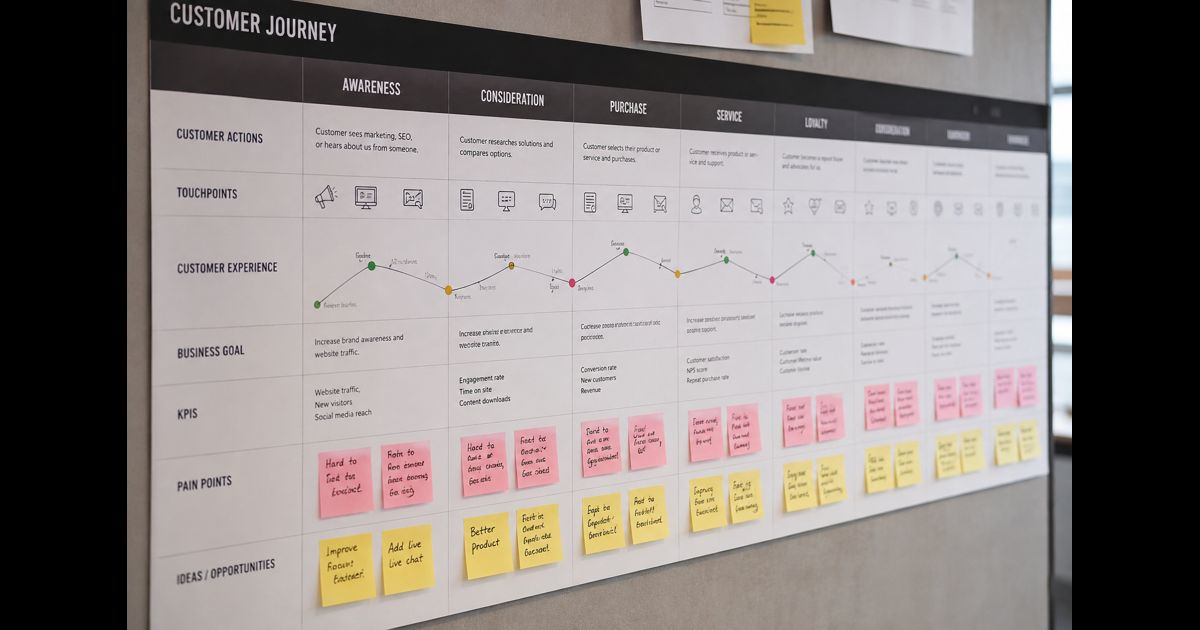
Customer journey mapping for small business is the process of documenting what customers actually experience as they discover a business, evaluate it, buy, receive the product or service, seek help, return, and recommend it to others. A useful map connects each stage with customer actions, questions, touchpoints, expectations, friction, evidence, and the person responsible for improving the experience.
For a small business, the map does not need to be an elaborate diagram. A spreadsheet, table, whiteboard, or shared document can work. Accuracy matters more than presentation.
The purpose is to answer practical questions:
- Where are potential customers becoming uncertain?
- Which interactions help them move forward?
- Where do customers abandon the process?
- Which problems occur repeatedly?
- What happens immediately after the sale?
- Which improvements are most likely to affect conversion, satisfaction, retention, or referrals?
The strongest journey maps are based on observed behavior rather than an imagined ideal experience.
Customer Journey Map vs. Sales Funnel
A sales funnel measures movement toward a commercial outcome. It might track visitors, leads, qualified prospects, purchases, and repeat customers.
A customer journey map examines the experience behind that movement.
For example, a funnel may reveal that 100 people requested a quote and only 20 became customers. The journey map investigates what happened between those points: how long people waited, what information they received, what questions remained unanswered, which alternatives they considered, and what caused some of them to leave.
Both views are useful, but they answer different questions.
|
Sales funnel |
Customer journey map |
|
Measures progression |
Explains experience |
|
Focuses heavily on conversion |
Covers the complete relationship |
|
Uses stages and conversion rates |
Uses actions, needs, touchpoints and friction |
|
Shows where customers leave |
Helps investigate why they leave |
|
Often ends near purchase |
Continues through service, retention and advocacy |
A small business should not replace its funnel with a journey map. The two become more valuable when funnel data identifies a problem and journey evidence helps explain it.
What a Small Business Customer Journey Map Should Contain
There is no universal layout, but a practical map should contain enough information to connect customer behavior with an improvement the business can make.
Customer segment
Map one meaningful customer type at a time.
A local accounting firm, for example, may serve self-employed professionals and established companies. Their buying processes, questions, approval requirements, service expectations, and renewal decisions can differ substantially.
Combining them into one journey can hide those differences.
Segmentation does not require an elaborate fictional persona. Relevant distinctions might include:
- first-time versus returning customer;
- consumer versus business buyer;
- local versus remote customer;
- high-value versus routine purchase;
- self-service versus assisted buyer.
Use distinctions that genuinely change the experience.
Customer goal
Record what the customer is trying to accomplish at each stage.
The goal is rarely simply “interact with the business.”
A customer may be trying to determine whether a company is trustworthy, understand the total cost, compare alternatives, complete an order quickly, learn how to use a purchase, resolve a problem, or decide whether to buy again.
This keeps the map centered on the customer's task rather than the company's departments.
Actions
Document what customers actually do.
Examples include reading reviews, visiting a service page, calling for information, requesting a quote, comparing prices, completing a form, opening an onboarding email, contacting support, making another purchase, or recommending the company.
Actions are particularly useful because many can be verified.
Touchpoints
A touchpoint is an interaction or point of exposure between the customer and the business.
For a small company, touchpoints can include:
- referrals;
- local listings;
- website pages;
- reviews;
- social accounts;
- email;
- phone calls;
- contact or quote forms;
- appointments;
- physical locations;
- checkout;
- invoices;
- delivery;
- onboarding;
- customer support;
- renewal notices.
Do not limit the map to marketing channels. An unclear invoice or delayed support response can influence the relationship just as much as an advertisement or landing page.
Questions and expectations
Customers carry questions from one interaction to another.
Before purchasing, these might include:
- Is this business credible?
- Does it solve my specific problem?
- What will it cost?
- What exactly is included?
- How long will it take?
- What happens after I pay?
After purchasing, the questions change:
- What happens next?
- When will it arrive or begin?
- Who should I contact?
- How do I use it?
- What happens if something goes wrong?
A journey map becomes more useful when these questions are recorded instead of assuming the customer already understands the process.
Friction
Friction is anything that makes the customer's intended progress harder, slower, less certain, or less satisfactory.
Typical examples include:
- missing pricing information;
- slow responses;
- unnecessary form fields;
- unclear next steps;
- inconsistent information;
- difficult appointment scheduling;
- unexpected charges;
- confusing checkout;
- poor mobile usability;
- missed handoffs;
- delayed delivery;
- complicated returns;
- repeated requests for the same information.
Not every inconvenience deserves immediate investment. The map should help distinguish minor irritation from friction that materially affects customer behavior.
Customer sentiment
A simple positive, neutral, or negative rating is often enough.
Businesses with better evidence can use satisfaction surveys, support comments, reviews, interview responses, or other feedback instead of assigning emotions based purely on staff assumptions.
Evidence
Every important observation should ideally have an evidence source.
A simple evidence column can contain entries such as:
- analytics;
- CRM records;
- support tickets;
- call notes;
- customer interview;
- survey;
- review;
- sales feedback;
- observed behavior;
- assumption requiring validation.
This is one of the most useful additions for a small business because it separates known problems from internal opinions.
Owner
Once a problem is identified, record who can act on it.
An issue without ownership often remains on the map indefinitely.
The owner might be marketing, sales, customer service, operations, the website manager, or the business owner. In a very small company, one person may own several stages.
A Practical Customer Journey Map Template
A small business can begin with this structure:
|
Stage |
Customer goal |
Action |
Touchpoint |
Question/expectation |
Friction |
Evidence |
Owner |
Metric |
|
Discovery |
Find a suitable option |
Reads or hears about business |
Referral, website, listing |
“Can this business help me?” |
Unclear positioning |
Traffic/referral data |
Marketing |
Qualified visits |
|
Evaluation |
Decide whether to trust the business |
Reviews services and proof |
Website, reviews, phone |
“Is it credible and suitable?” |
Missing information |
Calls, reviews, analytics |
Marketing/Sales |
Inquiry rate |
|
Decision |
Complete purchase or booking |
Requests quote or checks out |
Form, call, checkout |
“What will happen if I proceed?” |
Long form or unclear terms |
Form/checkout data |
Sales/Operations |
Conversion rate |
|
Delivery |
Receive expected value |
Uses product or receives service |
Delivery, onboarding |
“Did I get what I expected?” |
Delays or weak onboarding |
Feedback/support data |
Operations |
Complaints/satisfaction |
|
Retention |
Continue relationship |
Returns, renews or reorders |
Email, account, service |
“Should I use them again?” |
No follow-up |
Repeat-purchase data |
Service/Marketing |
Retention rate |
|
Advocacy |
Recommend experience |
Reviews or refers |
Review/referral channel |
“Is this worth recommending?” |
No convenient route |
Review/referral data |
Marketing/Service |
Referral rate |
The labels should be adapted to the actual business. A restaurant, consultancy, home-services company, online retailer, and subscription business will not have identical journeys.
How to Build a Customer Journey Map
1. Choose one journey with a clear boundary
Do not attempt to map every possible customer interaction at once.
Choose one important journey, such as:
- first discovery to first purchase;
- inquiry to completed service;
- purchase to successful onboarding;
- support request to resolution;
- first purchase to repeat purchase.
Define where the journey starts and where it ends.
This keeps the first version manageable and makes evidence easier to collect.
2. Choose the customer segment
Select the group whose experience you are examining.
If different groups take substantially different routes, create separate maps. A high-value B2B prospect requiring several approvals should not automatically share a map with an individual making an immediate online purchase.
3. Reconstruct the actual path
List the steps customers currently take, not the steps the business would prefer them to take.
A real journey may look like:
Referral → homepage → reviews → service page → phone call → quote → follow-up question → purchase → confirmation → service → invoice → support → repeat purchase.
Another customer might enter through a completely different route.
Customer journeys are often non-linear. People revisit pages, switch devices, compare competitors, leave and return, ask another person for approval, or contact the business through several channels.
The map should preserve meaningful detours rather than forcing every customer into a perfect straight line.
4. Inventory the touchpoints
For each stage, identify where the customer encounters the business.
Include both controlled touchpoints, such as the website and emails, and less-controlled influences, such as third-party reviews and referrals.
Then examine transitions between them.
The transition is frequently where problems occur. A website may successfully generate an inquiry, for example, while the follow-up process takes two days. Looking at the website and sales process separately can hide that break.
5. Add customer goals and questions
At each step, ask what the customer needs before progressing.
Suppose a visitor reaches a pricing page. The business may see that as a page view. The customer may be trying to establish whether the total cost fits a budget and whether additional charges will appear later.
Those are different perspectives.
Mapping the underlying question makes it easier to determine whether the touchpoint provides an adequate answer.
6. Add evidence
Use the best evidence available rather than waiting for perfect research.
Useful sources include website analytics, abandoned forms, conversion data, sales notes, CRM records, customer emails, support conversations, reviews, returns, cancellations, surveys, and interviews.
Frontline staff can also identify recurring problems because they hear customer questions directly.
The important distinction is between evidence and assumption.
If the team believes customers abandon a form because it is too long, mark that as an assumption until behavior, feedback, or testing supports it.
7. Identify moments that disproportionately affect the outcome
Not every interaction carries equal weight.
Pay particular attention to moments where customers:
- decide whether to trust the business;
- commit money or information;
- wait for a response;
- encounter an unexpected requirement;
- move between employees or systems;
- experience the product or service for the first time;
- encounter a problem;
- decide whether to return.
A small improvement at a decisive point can be more valuable than redesigning several low-impact interactions.
8. Prioritize problems instead of fixing everything
Once the map is populated, it may contain dozens of possible improvements.
Use a simple prioritization method. Score each problem from 1 to 5 for:
Frequency: How often does it occur?
Impact: How strongly can it affect conversion, satisfaction, retention, cost, or trust?
Confidence: How strong is the evidence?
Then consider implementation effort separately.
For example:
|
Problem |
Frequency |
Impact |
Confidence |
Effort |
|
Quote responses routinely delayed |
5 |
5 |
5 |
Medium |
|
Confirmation email unclear |
4 |
3 |
4 |
Low |
|
Minor visual inconsistency |
2 |
1 |
3 |
Low |
This prevents visible but relatively unimportant problems from consuming resources while costly friction remains unresolved.
9. Assign an owner and expected outcome
Convert each selected problem into a defined improvement.
Instead of:
“Improve onboarding.”
Use:
“Reduce the time between payment and the first onboarding instruction.”
Then assign responsibility and choose a metric.
This turns the journey map from a workshop artifact into an operating tool.
10. Measure what changed
Record a baseline before making significant changes whenever possible.
Relevant measures may include:
- inquiry completion rate;
- quote-to-sale conversion;
- checkout completion;
- response time;
- time to first value;
- support contacts per order;
- cancellation rate;
- return rate;
- repeat-purchase rate;
- renewal rate;
- customer satisfaction;
- referral or review activity.
Avoid claiming success because the new process looks cleaner internally. The relevant question is whether the customer experience or business outcome improved.
Example: Mapping a Local Service Business
Consider a home-services company receiving inquiries through its website and phone.
Its initial journey might be:
Discovery: A homeowner receives a recommendation and visits the website.
Evaluation: The homeowner checks services, coverage area, reviews, availability, and signs of credibility.
Inquiry: A quote form is submitted.
Response: The company contacts the homeowner and asks additional questions.
Decision: The customer accepts an estimate and books the work.
Service: The appointment takes place.
Completion: The customer receives the final invoice and payment instructions.
Aftercare: The customer contacts the company if a problem develops.
Retention: The customer may return for another service or recommend the company.
Mapping the journey may reveal that marketing is not the main weakness. Perhaps inquiries arrive consistently, but customers wait too long for a quote. Or appointments are successful but customers receive no clear confirmation of what happens next. Or satisfied customers have no convenient way to leave feedback or arrange future work.
The value of mapping is finding the specific break rather than applying a broad solution to the entire customer experience.
Current-State and Future-State Journey Maps
A current-state map records what customers experience now.
A future-state map describes an experience the business intends to create.
Do not confuse them.
The current-state version should be built first because improvement requires an accurate baseline. Once important problems have been validated, a future-state map can show how interactions, responsibilities, timing, or systems should change.
Keeping the two separate also prevents desired processes from being mistaken for existing ones.
Journey Mapping for Businesses With Limited Data
A small company may not have sophisticated analytics, a large CRM database, or a dedicated customer-experience team.
That does not prevent useful mapping.
Start with evidence already generated by normal operations:
- Review recent customer emails and messages.
- List questions that repeatedly appear before a sale.
- Review complaints, refunds, cancellations, and support requests.
- Ask sales or customer-facing staff where conversations commonly stall.
- Examine basic website and conversion data where available.
- Speak directly with several recent customers.
- Compare what customers describe with the process documented internally.
A handful of detailed conversations can expose problems that aggregate metrics cannot explain. Conversely, analytics can reveal patterns that individual anecdotes exaggerate or miss. Combining qualitative and quantitative evidence produces a stronger map than relying entirely on either.
Questions to Ask Customers
Customer interviews are most useful when they reconstruct actual events.
Instead of asking only, “Were you satisfied?”, ask:
- What first made you look for a solution?
- How did you first hear about the business?
- What did you do next?
- What information did you need before deciding?
- What almost stopped you from continuing?
- Was anything unclear or unexpected?
- What alternatives did you consider?
- What happened immediately after you purchased?
- When did you need help?
- What would have made the process easier?
- What influenced your decision to return or not return?
Questions about a completed experience generally provide better evidence than asking customers to speculate about what they might do.
Common Customer Journey Mapping Mistakes
Mapping the internal process instead of the customer experience
“Sales sends lead to operations” describes an internal workflow.
“The customer waits for appointment confirmation” describes the customer's experience of that workflow.
Both can be documented, but they should not be confused.
Assuming every journey is linear
Customers can leave, return, switch channels, revisit decisions, seek recommendations, compare alternatives, or skip stages.
A useful map reflects important variations.
Treating assumptions as facts
Staff knowledge is valuable, but proximity to the business can distort perspective.
Mark uncertain observations and validate the ones that influence important decisions.
Creating one map for every customer
A map broad enough to represent everyone can become too generic to explain anyone.
Separate journeys when customer goals, channels, buying processes, or service expectations materially differ.
Stopping at the purchase
The customer experience continues through fulfillment, onboarding, usage, billing, support, renewal, repeat purchase, cancellation, and advocacy.
Ignoring these stages can hide the causes of weak retention.
Documenting pain points without ownership
A list of problems does not improve customer experience.
Each priority issue needs an owner, intended change, and way to evaluate the result.
Overcomplicating the first version
More rows, colors, diagrams, and software do not automatically produce better insight.
Start with enough detail to make a decision. Add complexity only when it improves understanding.
How Often Should a Customer Journey Map Be Updated?
A journey map should change when the underlying customer experience changes.
Review it after significant changes such as:
- a new product or service;
- a website redesign;
- a different checkout or booking system;
- new pricing;
- a major marketing channel;
- changes to sales or support;
- new delivery or fulfillment processes;
- increasing complaints or cancellations;
- a meaningful change in customer behavior.
For an otherwise stable small business, a periodic review can check whether the map still represents reality. High-growth businesses may need to revisit important journeys more frequently because processes and customer expectations change faster.
How to Know Whether the Map Is Useful
A useful customer journey map should allow a team to answer four questions:
What is the customer trying to accomplish?
Where does progress become difficult or uncertain?
What evidence shows that the problem exists?
What specific change should be tested or implemented?
If a map contains attractive diagrams but cannot answer those questions, it needs refinement.
The goal is not to produce a perfect picture of every possible customer interaction. It is to create a sufficiently accurate view of the experience to make better decisions.
Customer Journey Mapping Checklist for Small Business
Before using a map to guide changes, confirm that:
- one meaningful customer segment is clearly defined;
- the start and end of the journey are clear;
- actual customer actions are documented;
- digital, human, physical, and post-purchase touchpoints are considered;
- customer goals and important questions are recorded;
- friction is distinguished from minor inconvenience;
- evidence is separated from assumptions;
- important transitions between channels or employees are visible;
- post-purchase experience is included;
- high-impact problems are prioritized;
- each priority improvement has an owner;
- relevant baseline metrics are recorded;
- changes can be evaluated after implementation.
Final Thoughts
Customer journey mapping for small business is most valuable when it moves beyond a diagram and becomes a practical way to diagnose customer experience.
Start with one customer segment and one important journey. Reconstruct what actually happens, document the customer's goals and questions, identify the touchpoints, and support important observations with evidence. Then prioritize the friction that occurs frequently, carries meaningful consequences, and can realistically be improved.
The finished map should make the relationship between customer experience and business operations visible. When a business can see where customers hesitate, wait, become confused, receive value, encounter problems, or decide to return, it can improve those moments deliberately rather than relying on assumptions.
Frequently Asked Questions
What is customer journey mapping for small business?
Customer journey mapping for small business documents how a customer experiences the business across discovery, evaluation, purchase, delivery, support, retention, and advocacy. It combines customer actions, goals, touchpoints, questions, friction, evidence, and business ownership in one structured view.
What are the main stages of a customer journey?
A practical small-business journey may include discovery, evaluation, decision, purchase, delivery or onboarding, support, retention, and advocacy. Businesses should adapt the stages to how their customers actually behave rather than forcing every journey into a fixed model.
What is a customer touchpoint?
A customer touchpoint is any interaction or meaningful point of exposure between a customer and a business. Examples include referrals, websites, reviews, phone calls, emails, forms, appointments, checkout, delivery, invoices, support, and renewal communication.
Can a small business create a customer journey map without special software?
Yes. A spreadsheet, shared document, whiteboard, or paper can be sufficient. The quality of the customer evidence and the decisions produced by the map matter more than the software used to display it.
Should a business create one customer journey map for all customers?
Usually not when major customer groups behave differently. Separate maps are more useful when segments have different goals, channels, buying processes, decision criteria, or service expectations.
How do you find pain points in a customer journey?
Combine behavioral data with direct customer evidence. Look at abandonment, delays, repeated questions, complaints, cancellations, support requests, reviews, interviews, conversion changes, and handoffs between channels or employees. Recurring problems supported by several sources deserve particular attention.
Does the customer journey end after a purchase?
No. Delivery, onboarding, usage, billing, customer service, repeat purchasing, renewal, cancellation, reviews, and referrals can all influence the value of the relationship after the initial transaction.
What should a small business do after completing a journey map?
Prioritize the most consequential friction, assign an owner to each selected improvement, record an appropriate baseline metric, make the change, and compare subsequent results. The map becomes useful when its findings lead to measurable improvements rather than remaining a static document.